
Control mode
It is possible to change the way the P-1’s main controls work to better suit your needs. By default the pedal uses control mode A, where the song is triggered on the release of the play switch.
In control mode B, the play and pause commands are sent as the play switch is pushed down. The stop command is triggered by pressing [Previous] and then [Play]. When a song is looping, pressing [Previous] queues the song to stop when the current loop finishes.
In control mode C, there is no pause control. The play command is sent as the play switch is pushed. The stop command is sent when it is pushed again.
Controls for each mode
Section titled “Controls for each mode”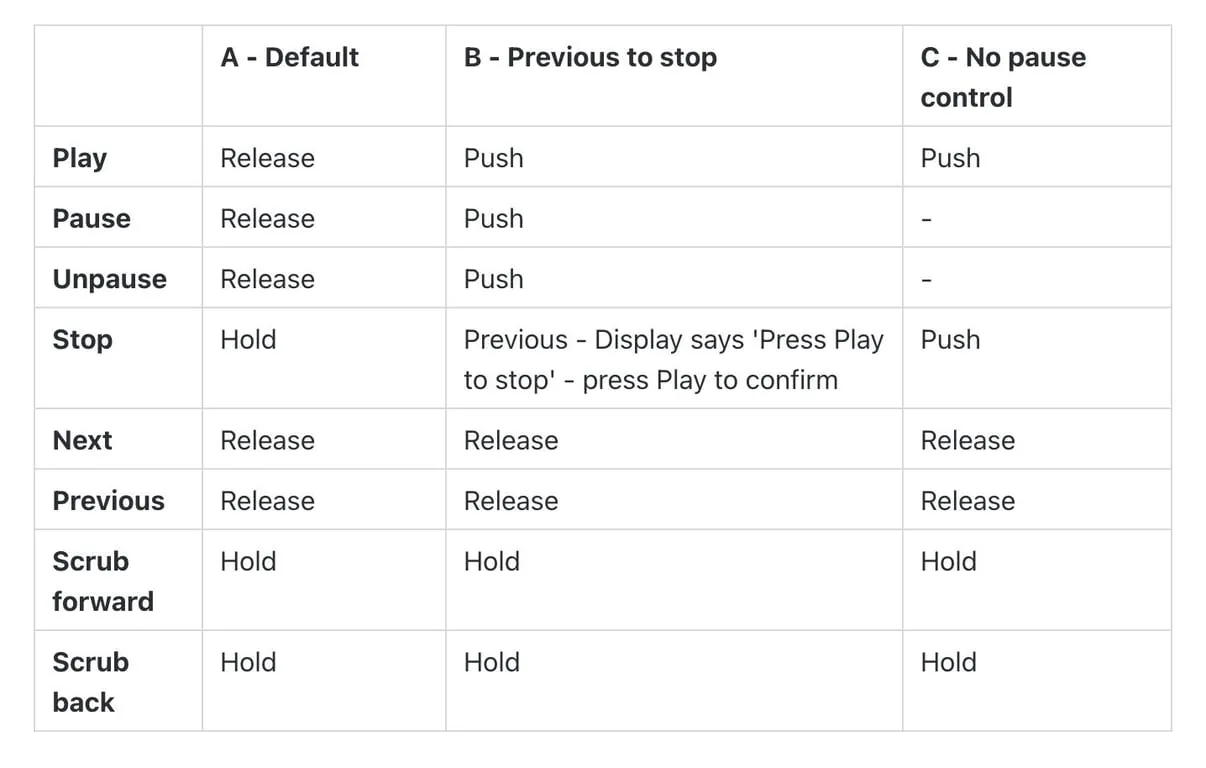
To change control modes
Section titled “To change control modes”Open the ‘Settings’ menu by pressing the left encoder, selecting ‘Settings’, then ‘Control system’. Choose your desired mode then press the encoder again to select it.