
Introduction to the Idoru P-1
What is the Idoru P-1?
Section titled “What is the Idoru P-1?”The Idoru P-1 is a simple, compact, and tough multi-channel audio and MIDI backing track player. Designed specifically for live musicians.
The P-1 can play up to 6 WAV files at once. It has 6 mono outputs and a stereo headphone out, each with its own mixer. This allows you to create a custom mix for each output.
The Idoru P-1 in use
Section titled “The Idoru P-1 in use”Multitrack backing
Section titled “Multitrack backing”A musician may decide to separate their backing into a WAV file per instrument, for example kick, snare, hats, percussion, bass, synths. They can then route each WAV to its own output and send them to the mix engineer alongside their live guitar and vocal, all on separate channels. This allows the mix engineer to individually adjust elements of the mix as they would with a fully live band.
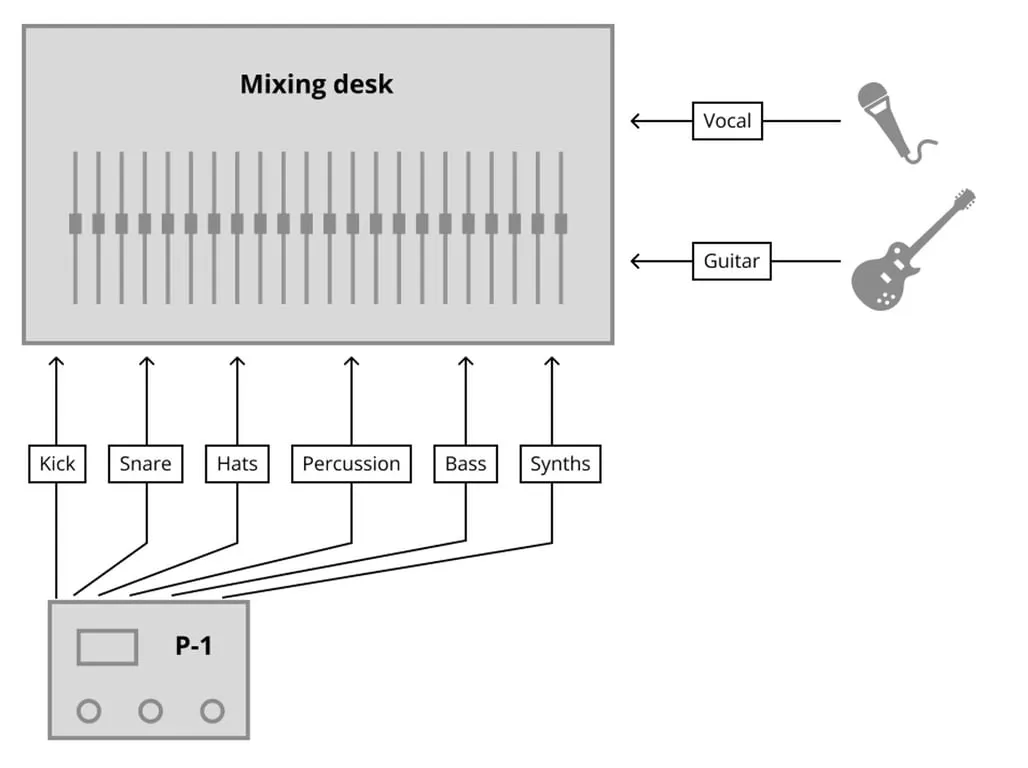
P-1 sending 6 channels to the mixing desk.
With a live drummer
Section titled “With a live drummer”If a live drummer plays in the group, they may want to create a click track WAV and have that fed to the headphones output alongside the other backing. This makes it easier for the drummer to keep time to the backing tracks. They can also run a signal to the aux input of the P-1, from the guitar amp for example, and send that to the drummer’s headphones too.
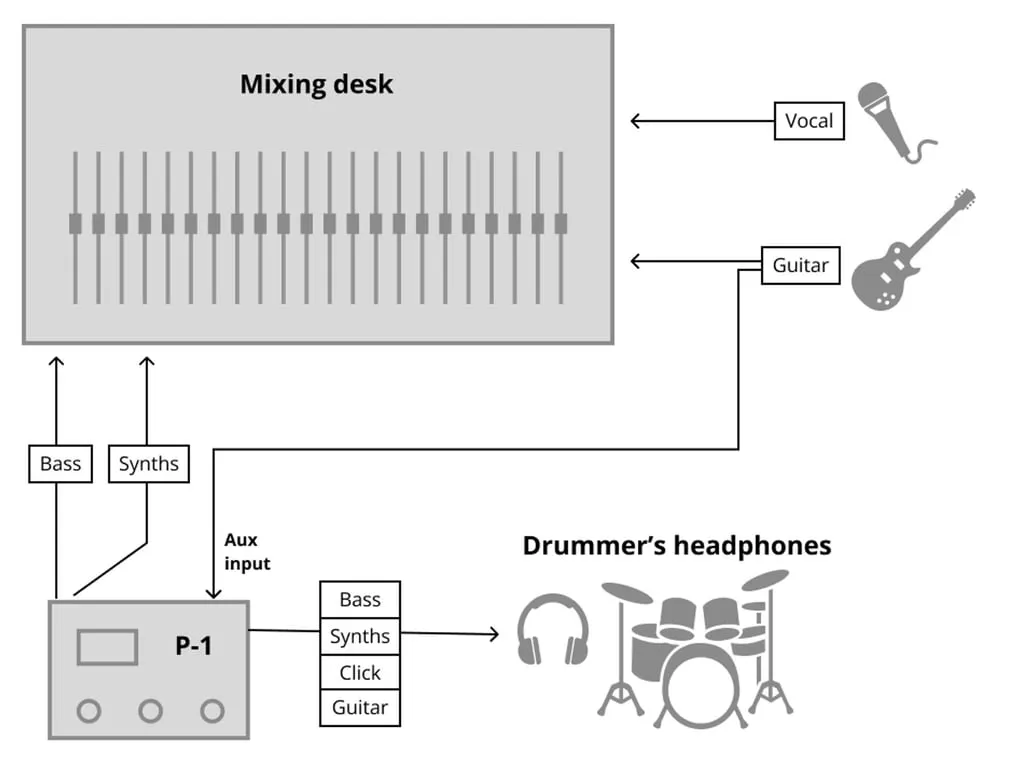
P-1 sending to mixing desk, and a submix to drummer’s headphones.
With MIDI playback
Section titled “With MIDI playback”The P-1 can also play a MIDI file alongside the audio, and output the MIDI via the MIDI port to control synths, amps, or other MIDI-compatible gear.
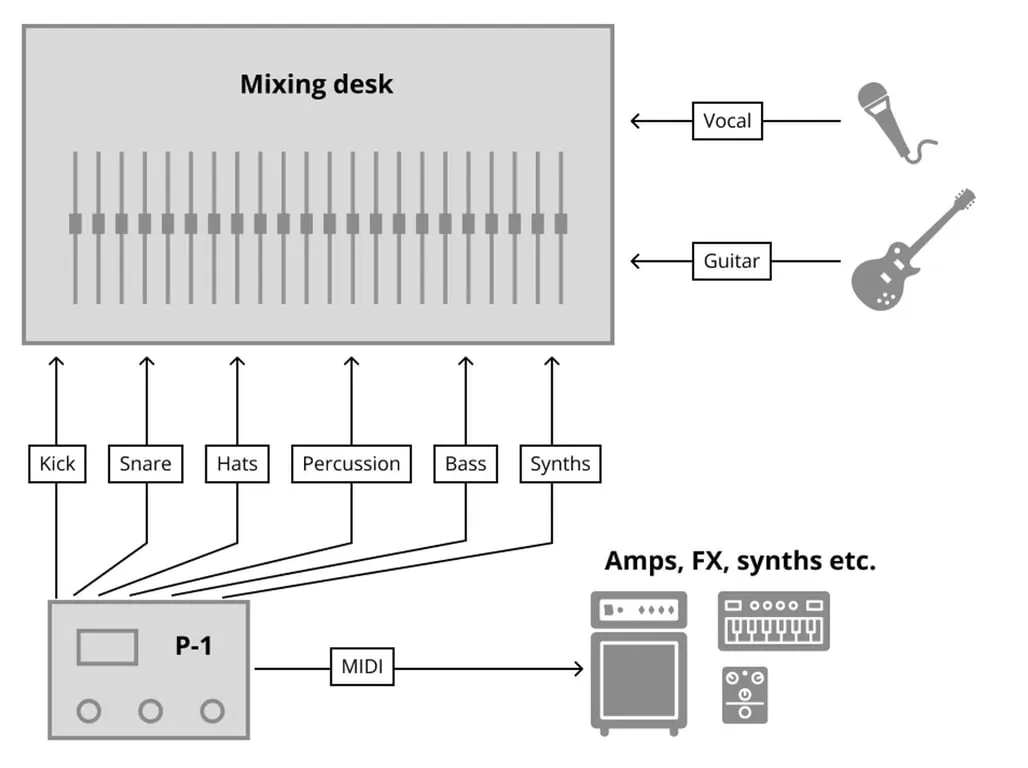
P-1 sending 6 channels to mixing desk and MIDI to other gear.
What is a song?
Section titled “What is a song?”A song is typically one song in your set. On the P-1 it is a set of 16-bit, 44.1 kHz WAV files that will be played together, optionally with a MIDI file, plus the levels and routings of those WAV files to the outputs. Every song in the same setlist must have a different name. With firmware v3.27 and desktop software v2.2.16 or later, you can have up to 100 songs in a setlist.
What is a setlist?
Section titled “What is a setlist?”A setlist is a collection of songs in a particular order. It also stores the levels and stereo pairing of outputs. You might use a setlist, for instance, as a set of songs prepared for one particular gig. With firmware v3.27 and desktop software v2.2.16 or later, you can store up to 10 setlists per SD card.
What is a session?
Section titled “What is a session?”A session is a collection of setlists and songs that will be stored on an SD card. When you click ‘Save’ you are saving a .idoru file to your computer, which is a session stored in a format the desktop software can read. When you click ‘Send session to P-1’ the software is exporting the session into a format the pedal can use.
Did we miss something? Not to worry! Just email us at contact@idoru.live. ✌️